23 February 2013

Swype vs Swiftkey Flow

I just commented on Land of Droid's comparative review of Swype vs SwiftKey Flow, and it struck me that my long comment about the differences that had been missed out in that review nearly amounted to a review in itself, so now that SwiftKey Flow is out of beta, here is my own take on the differences between the two.


02 November 2012

Scan as you Shop comes to Tesco

Anything that helps to streamline supermarket shopping is fine by me.   I'm not a fan of supermarket delivery services (I prefer to pick out my own produce).  So, as I'm going to be cruising the aisles myself, in my ideal tech-assisted grocery shopping world, I'd have:
  • To create a shopping list
    a smartphone (Android in my case) shopping list app that
    • allows us to have a shared shopping list that either of us can add to when we spot something we need
    • can be told or will learn what we buy regularly and prompt us to add those items to the list if the normal amount of time has passed since we last added them
    • allows optional easy-to-add-or-remove ad-hoc notes for any item on the list (e.g. Urgent; have coupon; special offer ends on ..., etc.)
  • To do the shopping
    • Something other than a wretched £1 coin/token system to release chained up shopping trolleys.  At branches without chained-up trolleys, I can take just my Android phone and credit card.  Unlike a man, I don't conveniently carry coins in an easily accessible pocket.  In fact, my cash is carried in a rucksack-style handbag, and is deliberately as inaccessible / thief-proof as possible.  I don't use cash much for anything!
    • The shopping list should allow me to teach it the order I'll navigate the aisles to find different types of items in different branches or stores.  I'm mad enough to actually take the time to do the intial set-up once (and tweak as necessary when the supermarkets move things around) to streamline subsequent trips.  Even better would be a Location-aware shopping list - although asking supermarkets to come up with an Android app I'd be happy with is probably a tall order, based on any I've seen so far! 
    • A way to avoid having to put everything in my trolley, queue and take it all out again at the till, and then repack it all after the checkout operator has scanned it.
Back in the real world, we use the Our Groceries shared shopping list, and I make do with a categorised list that isn't in aisle order (most apps can categorise and allow you to set up categories sorted in one order by judicious naming of the categories, but I do most of my supermarket shopping in any one of 4 different branches of Tesco, each of which has a different layout, of course).
 

Scan as you Shop


As to the queuing at the till part of things, I've been a huge fan of the Waitrose scan as you go system for many years, and disappointed that other supermarkets haven't introduced similar systems, as I don't often shop at Waitrose.

So I was delighted to discover that the Wokingham branch of Tesco has just introduced their own version, and it seems they plan to gradually roll it out to other branches too.  (I believe some other supermarket chains have now started to introduce similar systems as well.)

16 June 2012

BeyondPod

For some time now, I've been meaning to build on my mini reviews of DoggCatcher and BeyondPod in the PSC Forums, and perhaps do a comparative review.  However, this intention has been overtaken by the news you'll find at the end of this post.

I was involved in the beta testing of BeyondPod 3.0, which involved a major redesign of the UI.  This addressed the vast majority of my gripes with BeyondPod 2.9.15 and transformed it into something which (to my mind at least) is much more intuitive.

26 February 2012

Phones Show Chat 120 and my quest for a very portable laptop substitute

On a recent episode of the Phones Show Chat, I talked briefly with Steve and Tim about my quest for my perfect second device, so I thought I'd add some more detail here. As a bit of background, I have 2 active SIMs - my main one is in my phone (currently a Nexus S) and is an AYCE contract from Three UK. In general, I'll use this as a hotspot for other devices when I need to. My other one is on GiffGaff. This is a PAYG SIM that can be made to work like a contract if you want it to by using "Goodybags" and/or automatic topups, and uses the O2 network. Most of the time it's in PAYG mode (so costs me nothing when not in use) and I keep it in another phone in my bag, partly for emergencies - if the battery dies on my other phone, or if I can't get Three coverage - and partly to increase my chances of coverage when we're away in the campervan and don't know what to expect on any given campsite. For this purpose when we're going away I add a £10 goodybag that gives me unlimited data for a month (tethering not permitted), plus some inclusive calls and text messages. It occurred to me recently that if this SIM was in a small tablet with an optional decent keyboard, I could effectively have a pretty competent laptop replacement in my bag all the time.

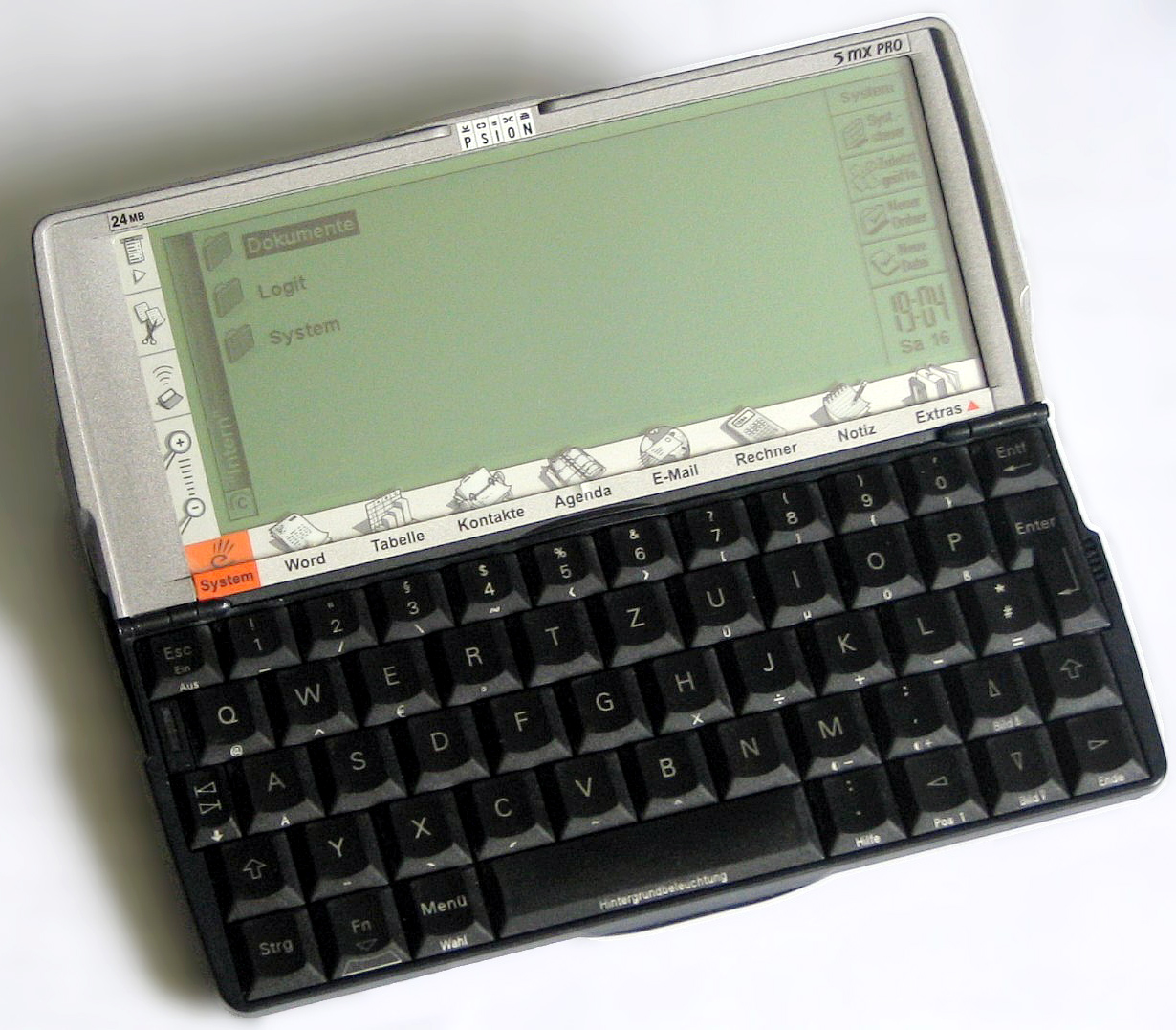
For me, a laptop replacement has to have a decent physical qwerty keyboard good enough to touch type on (so a little thumb keyboard is NOT going to work for me in this scenario, despite its portability) and a screen big enough to view full desktop websites. On the other hand, for media consumption (including ebook reading, podcast viewing/listening, etc.) a small tablet is a better option, as it's lighter and more comfortable to hold for long-ish periods. In terms of form factor, a slightly squarer version of my old beloved Psion5/5mx (i.e. the same width in landscape mode, but a little taller to give a 16:9 display) would be a good size - after all, I did used to carry one around in my bag in the days long before touchscreen PDAs and smartphones, so it clearly passes the handbag compatibility test. The keyboard may have been smaller than even the original eeePC's, but it was absolutely superb with good feel and travel and a conventional layout, so with my small hands I could use it to touch type completely normally. 7" would probably be the upper limit on size to fit in my bag, and even then, only if it's a slim device with small bezels. In with all the other stuff in my bag, it would need to wear a protective case. A 6" device with good display resolution would probably be the sweet spot for me. Oh, and it'll be running Android so that I can make use of all the apps I've already bought and use regularly.

22 August 2011

Party time! Phones Show Chat 100

The Phones Show Chat reaches its 100th episode in party mood, with regulars Steve Litchfield and Tim Salmon joined by Jon Satherley, Kev Wright, Rafe Blandford and myself to discuss what's been a pretty busy week or so in the mobile phone world, plus the usual features, including App of the Week.  This time, mine was Digital Clock for Android.

You'll find it here.

09 July 2011

MechCAD / AceMoney developer Alex Simanov dies with family in Russian plane crash

Yesterday I saw the sad news that Alex Simanov and his family were all killed in a plane crash, as reported by the Miami Herald and elsewhere.

In parallel with this, users of the AceMoney Yahoo group have been unable to post, although for some reason that I don't understand, I seem to be the only person who still can. I have to assume that as a long-standing group member, Alex had either forgotten to set my profile to require approval, or did not feel it necessary. Whatever the reason, we have no way to control it, and I don't know of anybody else who has been able to post without awaiting approval, which is, of course, unlikely ever to be forthcoming.

28 June 2011

Phones Show Chat 93

I was Steve and Tim's guest on the Phones Show Chat again this week.

Discussions included
  • my ever increasing frustration with the Nexus One's lack of application memory, and intention to wait until Samsung release the NFC-enabled version of the Galaxy S2 in the UK
  • a quick overview of my impressions of the Milestone 2 (kindly lent to me by Steve while my N1 was away for repair)
  • the Palm Pre 2 in brief (very brief!)
  • the pros and cons of hardware QWERTY keyboards
  • an update to Google Sites and Blogger which now allows the publisher to switch on a mobile-friendly version (now enabled on this blog)
  • Motorola Atrix / eeePad Transformer / ASUS padphone - transformable phone/tablet/notebook devices
  • Glympse - a short review
  • My app of the week: CamScanner for Android
... and much more.  Full show notes can be found on the PSC Forum

27 June 2011

Glympse for Android and other platforms - a review

Over the years, Andy and I have had occasions where we’ve wanted to find each other in an unfamiliar place.  Both of us have smartphones with GPS and navigation software, but sending a location and using the received location to navigate to always used to be a bit of a challenge. Then Google’s Latitude provided one possible solution - but only once you’ve set up who you want to share your location with. Here I Am 2 (for Android) and other similar apps allow a snapshot of current position to any email address or SMS number, but can be a bit fiddly to use. Recently, I discovered Glympse, and we’ve been using it partly for fun and partly for real while we’ve been away on holiday. The more I use it, the more I find it can do.  

27 May 2011

Tesco trials location aware shopping lists

Tesco has just announced a trial of its new "SatNav" electronic shopping list Android software ... not that there's any "Sat" involved, but any electronic shopping list that can be sorted into aisle order according to the store you're visiting is great news as far as I'm concerned ... always assuming the app itself is any good, of course.

I've been using electronic shopping lists, manually sorted (as best I can) into aisle order since I had my first Psion5, 12 years ago.  I currently use OurGroceries to maintain a shared shopping list with Andy, but getting it in aisle order for minimum-fuss shopping is a bit of a lost cause, especially as we regularly shop in 3 different Tesco stores, so grouping by product type is as far as it goes.

Sadly, the trial is only available in the Romford Tesco Extra store, or I'd be trying it out in a flash! Let's hope that the Reading Extra is the next test site :o)

17 May 2011

The Arc review

Steve's Phone Show review of the Xperia Arc with a little help from me is now available to view (complete with hideous thumbnail, courtesy of YouTube!)

A quick summary:

  • Slim hardware in the middle of the phone, with thicker top and bottom, housing the phono and microUSB slots. Sadly, these are on the sides, not the top (my preferred location for headset socket) and bottom (my strongly preferred location for the charger, to make it easier to use Brodit powered car mounts or desktop chargers). To be fair, Brodit have created a sideways slide-in mount for this phone, but those can never be quite as elegant as a "drop-in" design.  
  • Quite angular corners on the handset - I like it to look at, but not so much in use, but that's really just a personal preference.
  • Crisp screen, but no automatic brightness display, and some slight distortion in the review copy I used. However, this was only noticeable on close inspection of vertical lines close to the edge of the display (e.g. when playing WordFeud ;-) ).
  • A triumph of form over function for Contacts - graphic designers gone mad, without any apparent thought for usability.
  • I couldn't get the WiFi to work with either of the two routers I tried it with. However, Steve didn't have any problems. This is clearly one of those situations where both the phone and router affect the situation.
  • See Steve's views on the camera.
This won't be my device of choice (even without the show-stopping WiFi issues), but I quite enjoyed using it for the week.  

03 May 2011

Playing with the Arc

My Nexus One is stubbornly refusing to recognise my (or any other) SIM card, so while it goes for repair, I'm temporarily using the Sony Ericsson Xperia Arc as my main phone this week, as kindly lent by Steve Litchfield.  My thoughts and his to follow in the Phones Show, probably in show 139.

I'm also coming to the end of my contract (which was originally for the Nokia N97!), so I'm starting to look around for my next phone.  However, I don't think this is going to be the one for me. And this time round, I won't make the mistake of getting something for which Brodit don't make a powered mount.  (There is one for the Arc, but with the power plugged in and a headphone / speaker connection, it really does look as though it's sprouted ears, as the charging socket is on the top right, and the headphone socket is on the top left.  Not the most elegant setup in the car!)

When I bought the Dext and found that no Brodit mount was available, I realised just how much I rely on them ... and with the Nexus One's charging socket being sensibly positioned on the bottom of the phone (manufacturers, please take note!) I really appreciate just being able to slot the phone into the cradle with no fiddly cables to plug in separately, especially in my own car where I have a Parrot MKi9000 A2DP Bluetooth handsfree to stream podcasts through the car speakers, so that I can literally just plug it in and go.  In my partner's company car, I have to slum and plug in an extra headset cable wired to the car stereo.  I even have a Setting Profiles rule set up to start my podcatcher/player automatically when it detects power + headphones or my Parrot ;-).

06 March 2011

Words with Friends vs Wordfeud for Android

I don't know how I first heard about Words with Friends. I knew it existed back in December 2010, and was looking forward to trying it out. When I discovered that my best friend of 30 years' standing played it on her iPhone, I was even more keen for it to be released on Android. It arrived in the market on 15 February 2011.

Then I found mention of Wordfeud in the comments about hemorrdroids' video review of WwF, and I've now been playing games in both for a week or so. Wordfeud has been around since before September 2010 (I haven't been able to dig back further than that).

Thank you to all of the various opponents I've been playing against - you know who you are - for providing (often terrifyingly high-scoring) opposition.

Here are my thoughts, observations, likes, dislikes, wishlist and finally a conclusion about the two games head-to-head.

NB: All graphics are taken from the Android Market and/or the developer's website.

08 February 2011

Guest on Phones Show Chat

My turn to guest again on this week's Phones Show Chat podcast number 74, with Steve Litchfield and Tim Salmon.

Discussions included Doggcatcher and SafeWallet amonst various other topics.

13 November 2010

Storing passwords and other secure data - at last, a full multi-platform solution

Since my original post on the subject of secure storage of passwords etc. on Android (and other platforms), there has been a significant update.  Today, SBSH Software has released SafeWallet for Android, hot on the heels of SafeWallet 2.0 for Windows which includes Dropbox support, and a few weeks after the release of versions for Mac and iPhone.  A Symbian client has been available for some time.  

18 October 2010

Guest on the Phones Show Chat

My first appearance on PSC, with Steve Litchfield and Tim Salmon. Thoroughly enjoyed it. Thanks to Steve and Tim for inviting me, and for putting in all the hard work behind the scenes!

24 June 2010

Storing passwords and other secure data - migrating from HandySafe Pro to an Android solution

One of the biggest issues for me - and other ex-Symbian users - was the lack of an encypted home for my passwords and other little useful snippets of information. HandySafe Pro gave me a (paid) synchronised Windows and Symbian where I had access to my passwords on 2 Windows PCs (home and work) and a Symbian handset, and synchronisation between them - in this case via the phone, using PC Suite.  I needed something that would give me the same functionality with an Android handset.
Yes, Evernote (at least the Premium version) allows me to encrypt snippets of text for privacy, but I had a whole database of information already in HandySafe Pro that I needed to migrate to a solution that would allow me to access the same information on my desktop PCs and Android handset.

21 June 2010

4 minutes of fame (well, almost)

Steve Litchfield interviews me for a User Story on The Phones Show video podcast episode 114 (there's other news in the Podcast too!)


16 June 2010

Making the change: Switching from Symbian to Android


Having been a long-time Symbian user (E70, E90, N97 - spot the QWERTY keyboard theme), I had a heavy investment in Symbian and apps that I was used to and had paid for. 

However, I was also a heavy Google user (with a Google Apps account, and a significant investment in Gmail, Google Reader and Google Calendar, with a sprinkling of Picassa, Google docs, and a bit of Google Blogger thrown in for good measure), so it seemed reasonable that an Android phone would suit me well.  In fact, when I got my N97, the G1 was available ... but at the time, Android and the marketplace just didn't have the tools I needed on my phone for day-to-day use.  As well as getting used for the occasional phone call and text message, my smartphone also needed to be my podcatcher and player, occasional music player, camera, notepad, reference library for snippets of useful information, eBook reader, and a whole bunch of other things that Android and the G1 just couldn't do at the time.

13 May 2010

AppBrain

AppBrain is a web-based utility for users of Android phones.  I first came across it via Gina Trapani (Smarterware.org and TWiG).  It has a number of functions:
  • The phone app automatically populates your list with the apps already installed on your phone
  • It allows you to search the Android Marketplace from its web page (i.e. without using an Android phone), choose what you want to install / uninstall and then sync those choices with your phone
  • Once synced, you can ask AppBrain to Perform Installs - which means it will go to the Market Place for each of your pending installations and updates in turn, and start the process.  You still need to complete the installation yourself.  Once back at the MarketPlace listing, the Back button will proceed to the next app
  • It automatically puts updates to your apps in your Pending list for updates on the phone
  • It's social.  You can see what any Android user with Appbrain has installed if
    • they've made their list public
    • you know (or can guess) their Appbrain user name
  • It has embeddable built-in links to your own app list in various formats, including a widget showing a phone image with all your app icons.


12 May 2010

Portable Device History

My first PDA was a Psion 5, followed by a Psion 5mx in the late 1990s - possibly the most advanced handheld gadgets of their time, and with a QWERTY keyboard that in my view has still never been beaten on a pocketable device.  With the device open on a desk, I could actually touch type on it.  I ran my life on that thing, with no thought of synchronising with anything else - nor any desire to.  It had my calendar (most smartphone calendar apps these days could still learn a thing or two from Agenda), my contacts, my personal finances (courtesy of the brilliant RMRBank, with very slick integration with RMRFuel et al), my ToDo list (RMRTask), my supermarket shopping list (RMRShop), and all sorts of useful little snippets and documents.

After my screen cable failed (a common problem), and Psion had stopped producing the machine I searched around for a replacement.  The Palm didn't appeal to me, so I bought a newfangled Windows Mobile PDA - a Dell Axim 5.  When that died, I replaced it with a Dell Axim 50v.  The whole Windows Mobile period was pretty much a low point in my PDA timeline.  I've always liked physical QWERTY keyboards, and I never found a data entry method that I was happy with on the WinMo devices (and believe me, I tried loads).  I also hated the underlying assumption in Windows Mobile that the device was inherently "just" a portable copy of your PC.  Everything had to sync to Microsoft products on the PC with ActiveSync, and if there was any conflict, the PC won.  I never liked Outlook anyway, and was still used to running my life on the PDA, not the PC, so as far as I was concerned that whole approach stank.  The only saving grace on Windows Mobile was ListPro from IliumSoft - a brilliant and highly configurable list making application that could be used for ToDo lists, (reusable) shopping lists, (reusable) packing lists, and pretty much any other kind of list you might care to mention.  Try as I might, I've never found anything as powerful or useful on any other platform.  There was a PC version too, with synchronisation, although strangely I actually much preferred the Mobile UI for day-to-day use ;-).  

Then things took a turn for the better:  Nokia released the E70, a gull-wing QWERTY keyboard when open, with T9 keyboard when closed, and running what was then Series 60. After that, I progressed to the S60 communicator, the Nokia E90.  This time a brick of device with T9 on the outside and QWERTY and an enormous screen on the inside. It took over from my iPod as my music player, and I started to use it as my Podcatcher. In fact, downloading and playing podcasts became a core requirement. Sadly, because of the unusual screen dimensions on the internal screen, Nokia didn't keep the software updated as enthusiastically as they did for other devices, and anyway, what I really wanted was a more media-centric device. I wanted N-series with QWERTY. So, I pre-ordered the Nokia N97 (released on 19 June 2009), and despite its early problems was generally rather pleased with it.  

However, in parallel with all this, I was increasingly using Google's services for email, calendaring (I maintain at least 10 Google calendars, some of which are shared with others), and have read access to a number of others (either public, or shared with me by friends and family).  Early in 2010 I set up my domain to use Google Apps for Your Domains (aka GAYFD, or now - rather confusingly - just known as Google Apps).  I use Google Reader for RSS feeds, Google docs for documents I want to share, or may need when I'm out and about.  In short, I'm increasingly dependent on (and happy with) Google's services in general (plus Evernote and Dropbox), and I am increasingly running my life "in the cloud".  When the N97 was released, I considered the G1.  Android seemed to be a better fit with the way I was running my online life, but at the time, Android and the Android Marketplace were in their infancy and not yet up to what I needed from MY phone.  

A year on, and things had moved on fast in the Android world, but I was still tied into a 2 year contract on my N97.  However, a tweet from Steve Litchfield (of AllAboutSymbian and The PhonesShow fame, who I originally met back in my Psion days) alerted me to a way to try out Android.  Orange had dropped the price of the Motorola DEXT (aka CLIQ in the USA) to a very affordable £150 on a PAYG contract.  Having checked that I would be able to unlock it, I bought it (in April 2010) and promptly fell in love with Android.  Yes, it only ever officially ran 1.5 (Cupcake), so there were lots of things (turn-by-turn directions from Google Maps, in particular) that I can't use, but it dovetailed so well with my life in the cloud that I put up with the frankly inferior hardware for a while.

I was originally holding out until a) my contract expired, and b) somebody released a full Google Experience handset with a physical QWERTY keyboard, hopefully with a decent camera too! :o).  It never happened, but I decided that I could voluntarily manage without physical QWERTY for the first time in my life, and bought a Nexus One.

My contract expired, and as I was getting increasingly frustrated with the lack of application memory on my N1 while I was waiting for the NFC-enabled version of the Samsung Galaxy S2 to be released in the UK (which never happened), I bought a second hand Nexus S to tide me over. 

Now it looks as though my next device will be the recently-announced Galaxy SIII.