Showing posts with label Android. Show all posts

09 November 2020

How to deliver excellent software support

Digital dreams

I'm an application/user support engineer at heart, even though some of my recent career history might suggest otherwise (life has a way of doing that), so I particularly appreciate good support when I receive it. I've always prided myself on getting behind the initial question to the root of an issue, and I was delighted to be on the customer side of exactly that scenario this week.

One of my former employers who is a software developer put it very well when he said:

"Technical support is the area that makes or breaks the customer experience"

This is the story of a recent experience I had of great software support.

02 December 2017

Goodbye BeyondPod; Hello Podcast Addict

My Podcast app history

Years ago, I used to use Doggcatcher.  I can't even remember which apps I used before that.  I'd evaluated others, including "everybody's favourite" PocketCasts, but few had the sort of control and customisation I was looking for.  Then, in around 2011 or so, following an online discussion about podcatchers, I decided to try out BeyondPod 2.x, and was hooked, despite some quirks in the UI.

Version 3 was in beta at the time, and resolved many of those from my point of view; one thing led to another, and I agreed to work for BeyondPod's developer for a few hours per week, mostly handling support in their online forum (technically as a self-employed consultant, mostly just because it made international payments that much easier).

In my opinion, Version 4 had some different UI issues, but it did have a lot of functionality that worked for me, and I didn't actually see the UI much in day-to-day use, because for me a Podcast app isn't something that I spend a lot of time interacting with.  I just play my downloaded podcasts.  I may see the player, and occasionally add or delete feeds, or tinker with my playlists sometimes, but that's about it.


09 April 2015

One ring to rule them all ...

I'm looking for neat ideas to get the most from my new NFC ring.  
The March of the Droids event last month included a couple of NFC-related highlights. One was a presentation about NFC implants; the other was a trade stand for NFCRing.com.  I was looking forward to both.   
For those who don't know, NFC (Near Field Communication) is a technology whereby a powered device such as an NFC equipped smartphone can exchange data with a passive NFC tag or another powered NFC device.  The tag doesn't need any power (it draws what it needs from the other device).  It's really short range - for all practical purposes, you may as well assume that the device and tag need to be touching to work.  You can also use NFC between two powered devices (e.g. 2 smartphones) to initiate data transfer, such as sending a photo or your contact details to another phone, although the devices will generally use Bluetooth or WiFi direct for the actual data transfer; NFC is just used to set up the connection.

The same technology is used in Credit Card machines (the powered bit) and modern Debit cards (the passive bit) for Contactless payments.  Many Android and Blackberry phones and tablets have NFC radios, and the iPhone 6 and 6+ have it too, but Apple have restricted it so that it can only be used for Apple pay.
 

05 April 2015

Tesco Hudl2 Bluetooth keyboard case - a review

In January this year, I bought the amazing value Tesco Hudl2 to replace my aging original Nexus 7 as my primary tablet.  I bought a purple one, together with a matching purple "Soft Touch" folio case.

Purple Hudl2 in use in the keyboard case

I've always been a fan of physical keyboards.  I can type much faster than I can write - certainly for any sort of prolonged periods - and definitely faster than I can get the words that I want (with or without autocorrect interfering) with a touch keyboard of any sort on a phone or tablet.  In particular, a soft keyboard in landscape hides so much of a phone or tablet's screen that it drives me mad. I've tried a number of portable bluetooth keyboards over the years, but have been mostly disappointed.  My favourite is still the Freedom, which folds in half, and opens out as more-or-less a full-sized keyboard, but it's a bit of a faff unless you're sitting at a table with some serious typing to do. 

So with that in mind, this weekend, I spent some Tesco vouchers on a bluetooth keyboard case for my Hudl2.

06 March 2014

KitKat and removable SD cards


There has been a lot of panic and online discussion lately as Samsung (edit: and now Sony) have started rolling out KitKat to their devices, and people have suddenly found that things don't work as they used to with their SD cards.

Headline News:  SD cards have NOT stopped working - but some methods that apps used to use will no longer work.


Back when Honeycomb was released, Google introduced a new method of accessing SD cards, which was largely ignored at the time, but is now being implemented by Samsung (and maybe by other manufacturers who have devices with MicroSD card slots).  There's a long Android Police article about it, but here's the TL;DR version.
  • Every app still has read access to every file on your SD card.
  • Every app can still write to your SD card, but it will have to use one of the new methods.  Simply having write access to the card won't work any more. 
  • You do NOT need to root your device to regain write access to your SD card.
If your app doesn't support one of the new methods of writing to the card, you need to contact your app developer to ask them to update their app.  Be nice:  this change has rather been sprung on developers without much warning, so use whatever feedback method they request, rather than leaving a bad review in the Play Store.

04 August 2013

ChromeCast in the UK

ChromeCast dongle
The ChromeCast Dongle
My "other" boss - the one in the USA - managed to get hold of some of the first batch of ChromeCast devices, and was kind enough to post one to me to try out.

Of course, it's not officially available over here yet, which meant I was expecting that there might be some problems, so how did I get on?


23 February 2013

Swype vs Swiftkey Flow

I just commented on Land of Droid's comparative review of Swype vs SwiftKey Flow, and it struck me that my long comment about the differences that had been missed out in that review nearly amounted to a review in itself, so now that SwiftKey Flow is out of beta, here is my own take on the differences between the two.


16 June 2012

BeyondPod

For some time now, I've been meaning to build on my mini reviews of DoggCatcher and BeyondPod in the PSC Forums, and perhaps do a comparative review.  However, this intention has been overtaken by the news you'll find at the end of this post.

I was involved in the beta testing of BeyondPod 3.0, which involved a major redesign of the UI.  This addressed the vast majority of my gripes with BeyondPod 2.9.15 and transformed it into something which (to my mind at least) is much more intuitive.

26 February 2012

Phones Show Chat 120 and my quest for a very portable laptop substitute

On a recent episode of the Phones Show Chat, I talked briefly with Steve and Tim about my quest for my perfect second device, so I thought I'd add some more detail here. As a bit of background, I have 2 active SIMs - my main one is in my phone (currently a Nexus S) and is an AYCE contract from Three UK. In general, I'll use this as a hotspot for other devices when I need to. My other one is on GiffGaff. This is a PAYG SIM that can be made to work like a contract if you want it to by using "Goodybags" and/or automatic topups, and uses the O2 network. Most of the time it's in PAYG mode (so costs me nothing when not in use) and I keep it in another phone in my bag, partly for emergencies - if the battery dies on my other phone, or if I can't get Three coverage - and partly to increase my chances of coverage when we're away in the campervan and don't know what to expect on any given campsite. For this purpose when we're going away I add a £10 goodybag that gives me unlimited data for a month (tethering not permitted), plus some inclusive calls and text messages. It occurred to me recently that if this SIM was in a small tablet with an optional decent keyboard, I could effectively have a pretty competent laptop replacement in my bag all the time.

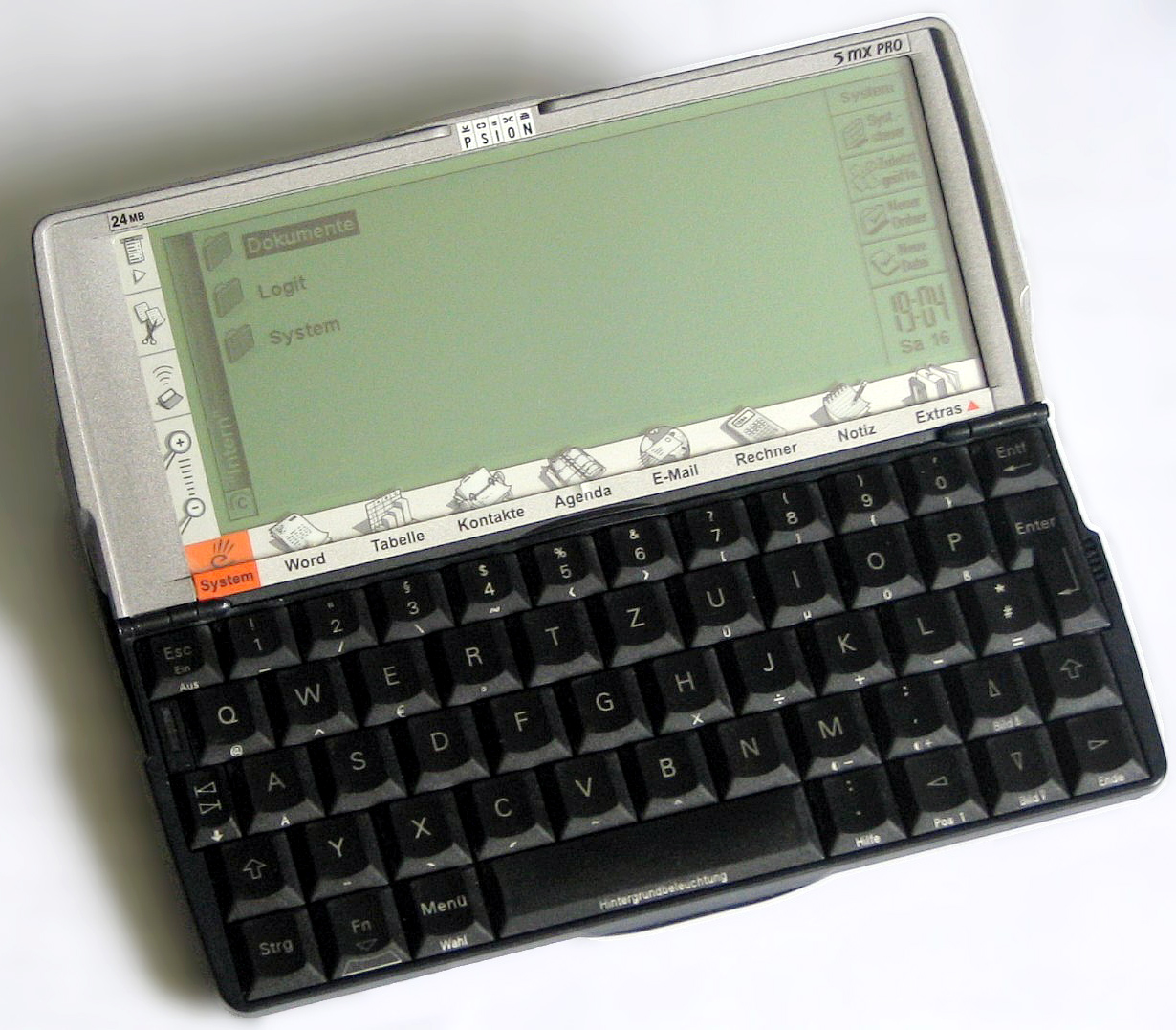
For me, a laptop replacement has to have a decent physical qwerty keyboard good enough to touch type on (so a little thumb keyboard is NOT going to work for me in this scenario, despite its portability) and a screen big enough to view full desktop websites. On the other hand, for media consumption (including ebook reading, podcast viewing/listening, etc.) a small tablet is a better option, as it's lighter and more comfortable to hold for long-ish periods. In terms of form factor, a slightly squarer version of my old beloved Psion5/5mx (i.e. the same width in landscape mode, but a little taller to give a 16:9 display) would be a good size - after all, I did used to carry one around in my bag in the days long before touchscreen PDAs and smartphones, so it clearly passes the handbag compatibility test. The keyboard may have been smaller than even the original eeePC's, but it was absolutely superb with good feel and travel and a conventional layout, so with my small hands I could use it to touch type completely normally. 7" would probably be the upper limit on size to fit in my bag, and even then, only if it's a slim device with small bezels. In with all the other stuff in my bag, it would need to wear a protective case. A 6" device with good display resolution would probably be the sweet spot for me. Oh, and it'll be running Android so that I can make use of all the apps I've already bought and use regularly.

22 August 2011

Party time! Phones Show Chat 100

The Phones Show Chat reaches its 100th episode in party mood, with regulars Steve Litchfield and Tim Salmon joined by Jon Satherley, Kev Wright, Rafe Blandford and myself to discuss what's been a pretty busy week or so in the mobile phone world, plus the usual features, including App of the Week.  This time, mine was Digital Clock for Android.

You'll find it here.

28 June 2011

Phones Show Chat 93

I was Steve and Tim's guest on the Phones Show Chat again this week.

Discussions included
  • my ever increasing frustration with the Nexus One's lack of application memory, and intention to wait until Samsung release the NFC-enabled version of the Galaxy S2 in the UK
  • a quick overview of my impressions of the Milestone 2 (kindly lent to me by Steve while my N1 was away for repair)
  • the Palm Pre 2 in brief (very brief!)
  • the pros and cons of hardware QWERTY keyboards
  • an update to Google Sites and Blogger which now allows the publisher to switch on a mobile-friendly version (now enabled on this blog)
  • Motorola Atrix / eeePad Transformer / ASUS padphone - transformable phone/tablet/notebook devices
  • Glympse - a short review
  • My app of the week: CamScanner for Android
... and much more.  Full show notes can be found on the PSC Forum

27 June 2011

Glympse for Android and other platforms - a review

Over the years, Andy and I have had occasions where we’ve wanted to find each other in an unfamiliar place.  Both of us have smartphones with GPS and navigation software, but sending a location and using the received location to navigate to always used to be a bit of a challenge. Then Google’s Latitude provided one possible solution - but only once you’ve set up who you want to share your location with. Here I Am 2 (for Android) and other similar apps allow a snapshot of current position to any email address or SMS number, but can be a bit fiddly to use. Recently, I discovered Glympse, and we’ve been using it partly for fun and partly for real while we’ve been away on holiday. The more I use it, the more I find it can do.  

27 May 2011

Tesco trials location aware shopping lists

Tesco has just announced a trial of its new "SatNav" electronic shopping list Android software ... not that there's any "Sat" involved, but any electronic shopping list that can be sorted into aisle order according to the store you're visiting is great news as far as I'm concerned ... always assuming the app itself is any good, of course.

I've been using electronic shopping lists, manually sorted (as best I can) into aisle order since I had my first Psion5, 12 years ago.  I currently use OurGroceries to maintain a shared shopping list with Andy, but getting it in aisle order for minimum-fuss shopping is a bit of a lost cause, especially as we regularly shop in 3 different Tesco stores, so grouping by product type is as far as it goes.

Sadly, the trial is only available in the Romford Tesco Extra store, or I'd be trying it out in a flash! Let's hope that the Reading Extra is the next test site :o)

17 May 2011

The Arc review

Steve's Phone Show review of the Xperia Arc with a little help from me is now available to view (complete with hideous thumbnail, courtesy of YouTube!)

A quick summary:

  • Slim hardware in the middle of the phone, with thicker top and bottom, housing the phono and microUSB slots. Sadly, these are on the sides, not the top (my preferred location for headset socket) and bottom (my strongly preferred location for the charger, to make it easier to use Brodit powered car mounts or desktop chargers). To be fair, Brodit have created a sideways slide-in mount for this phone, but those can never be quite as elegant as a "drop-in" design.  
  • Quite angular corners on the handset - I like it to look at, but not so much in use, but that's really just a personal preference.
  • Crisp screen, but no automatic brightness display, and some slight distortion in the review copy I used. However, this was only noticeable on close inspection of vertical lines close to the edge of the display (e.g. when playing WordFeud ;-) ).
  • A triumph of form over function for Contacts - graphic designers gone mad, without any apparent thought for usability.
  • I couldn't get the WiFi to work with either of the two routers I tried it with. However, Steve didn't have any problems. This is clearly one of those situations where both the phone and router affect the situation.
  • See Steve's views on the camera.
This won't be my device of choice (even without the show-stopping WiFi issues), but I quite enjoyed using it for the week.  

06 March 2011

Words with Friends vs Wordfeud for Android

I don't know how I first heard about Words with Friends. I knew it existed back in December 2010, and was looking forward to trying it out. When I discovered that my best friend of 30 years' standing played it on her iPhone, I was even more keen for it to be released on Android. It arrived in the market on 15 February 2011.

Then I found mention of Wordfeud in the comments about hemorrdroids' video review of WwF, and I've now been playing games in both for a week or so. Wordfeud has been around since before September 2010 (I haven't been able to dig back further than that).

Thank you to all of the various opponents I've been playing against - you know who you are - for providing (often terrifyingly high-scoring) opposition.

Here are my thoughts, observations, likes, dislikes, wishlist and finally a conclusion about the two games head-to-head.

NB: All graphics are taken from the Android Market and/or the developer's website.

13 November 2010

Storing passwords and other secure data - at last, a full multi-platform solution

Since my original post on the subject of secure storage of passwords etc. on Android (and other platforms), there has been a significant update.  Today, SBSH Software has released SafeWallet for Android, hot on the heels of SafeWallet 2.0 for Windows which includes Dropbox support, and a few weeks after the release of versions for Mac and iPhone.  A Symbian client has been available for some time.  

24 June 2010

Storing passwords and other secure data - migrating from HandySafe Pro to an Android solution

One of the biggest issues for me - and other ex-Symbian users - was the lack of an encypted home for my passwords and other little useful snippets of information. HandySafe Pro gave me a (paid) synchronised Windows and Symbian where I had access to my passwords on 2 Windows PCs (home and work) and a Symbian handset, and synchronisation between them - in this case via the phone, using PC Suite.  I needed something that would give me the same functionality with an Android handset.
Yes, Evernote (at least the Premium version) allows me to encrypt snippets of text for privacy, but I had a whole database of information already in HandySafe Pro that I needed to migrate to a solution that would allow me to access the same information on my desktop PCs and Android handset.

21 June 2010

4 minutes of fame (well, almost)

Steve Litchfield interviews me for a User Story on The Phones Show video podcast episode 114 (there's other news in the Podcast too!)


16 June 2010

Making the change: Switching from Symbian to Android


Having been a long-time Symbian user (E70, E90, N97 - spot the QWERTY keyboard theme), I had a heavy investment in Symbian and apps that I was used to and had paid for. 

However, I was also a heavy Google user (with a Google Apps account, and a significant investment in Gmail, Google Reader and Google Calendar, with a sprinkling of Picassa, Google docs, and a bit of Google Blogger thrown in for good measure), so it seemed reasonable that an Android phone would suit me well.  In fact, when I got my N97, the G1 was available ... but at the time, Android and the marketplace just didn't have the tools I needed on my phone for day-to-day use.  As well as getting used for the occasional phone call and text message, my smartphone also needed to be my podcatcher and player, occasional music player, camera, notepad, reference library for snippets of useful information, eBook reader, and a whole bunch of other things that Android and the G1 just couldn't do at the time.

13 May 2010

AppBrain

AppBrain is a web-based utility for users of Android phones.  I first came across it via Gina Trapani (Smarterware.org and TWiG).  It has a number of functions:
  • The phone app automatically populates your list with the apps already installed on your phone
  • It allows you to search the Android Marketplace from its web page (i.e. without using an Android phone), choose what you want to install / uninstall and then sync those choices with your phone
  • Once synced, you can ask AppBrain to Perform Installs - which means it will go to the Market Place for each of your pending installations and updates in turn, and start the process.  You still need to complete the installation yourself.  Once back at the MarketPlace listing, the Back button will proceed to the next app
  • It automatically puts updates to your apps in your Pending list for updates on the phone
  • It's social.  You can see what any Android user with Appbrain has installed if
    • they've made their list public
    • you know (or can guess) their Appbrain user name
  • It has embeddable built-in links to your own app list in various formats, including a widget showing a phone image with all your app icons.